
Connect your model endpoint
Configure where Ember sends extraction requests. Both the API and workers must be able to reach this address.
Before you start
Your role and required details
An administrator creates endpoints through /setup llm. Other users select an existing permitted endpoint for their prompts.
Have these details ready:
- The API base URL, including
/v1and any gateway path prefix. - The exact model name or gateway alias.
- A Bearer API key, if the server requires one.
Choose your setup
| Your model service | Follow |
|---|---|
| An institutional LiteLLM gateway | LiteLLM configuration |
| An existing or local vLLM server | vLLM configuration |
| Inference running on your Docker host | Docker and network addresses |
Ember uses the OpenAI-compatible Chat Completions API. Both LiteLLM and vLLM work with provider custom; no provider-specific plugin is needed.
1. Add the endpoint
Enter this inside the Ember workspace:
/setup llmFill in the fields
| Field | What to enter |
|---|---|
| Endpoint name | A recognizable name, such as Institution gateway |
| Provider | custom |
| Base URL | The server API root, including /v1 |
| Model | The exact served model name or gateway alias |
| API key | Enter the key in the masked field, or leave blank when authentication is disabled |
| Vision model | Optional; select a vision-capable model only when needed |
Do not append /chat/completions to the base URL. Ember adds that route when submitting requests.
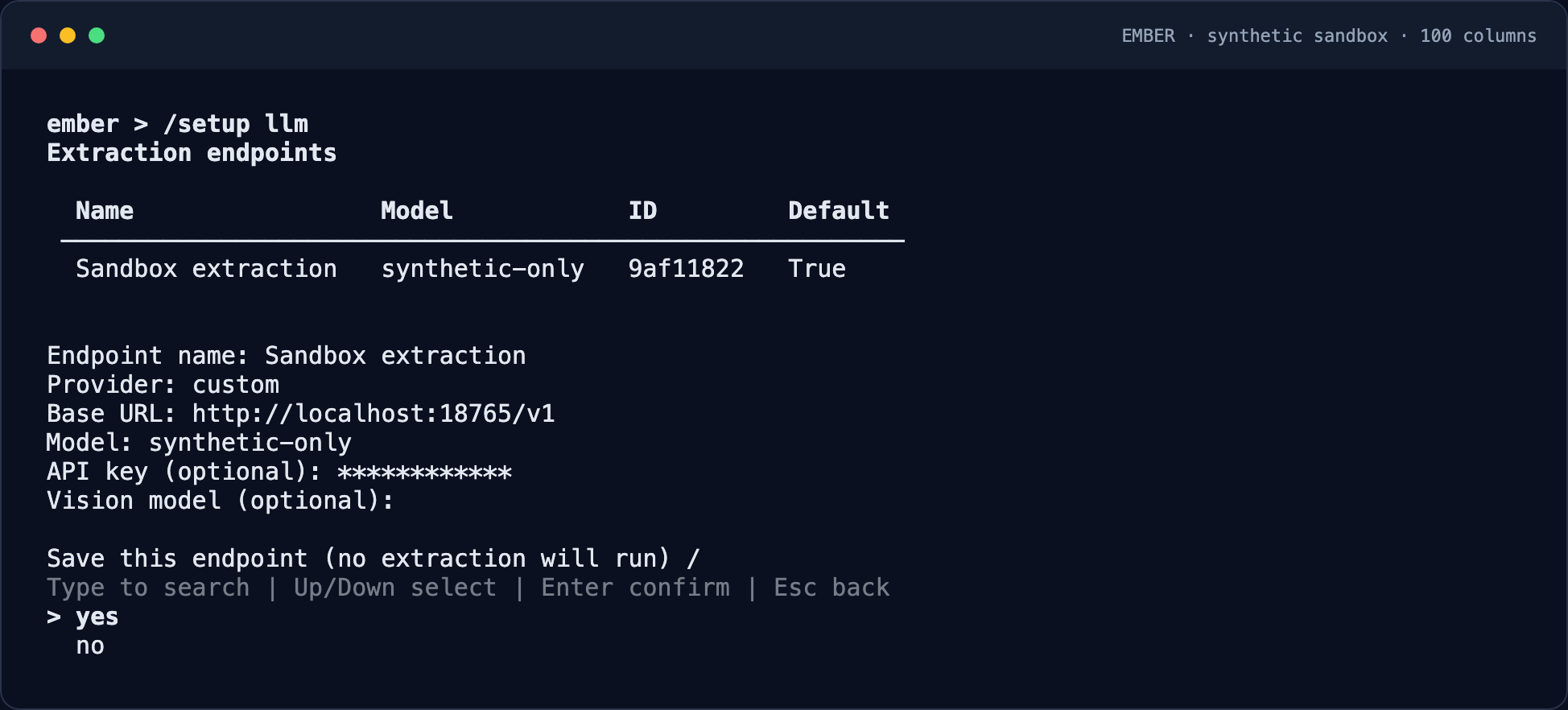
Save the configuration
Confirm saving after checking the model and URL. Saving alone does not invoke inference. You can then choose whether to run the optional connection probe.
2. Use your service's settings
LiteLLM gateway
Use the institution's gateway address, model alias, and LiteLLM virtual key. The gateway handles upstream providers; Ember does not need their credentials.
| Setting | Example |
|---|---|
| Provider | custom |
| Base URL | https://gateway.example.org/v1 |
| Model | The alias your gateway administrator provides |
| API key | Your LiteLLM virtual key |
The gateway alias may differ from the upstream model name. Copy the alias supplied for your account. See the LiteLLM gateway documentation for gateway administration.
vLLM server
An existing OpenAI-compatible vLLM deployment needs no Ember-specific adapter. Use its served model name and its API key when enabled.
| Deployment | Example base URL | API key |
|---|---|---|
| Institutional proxy | https://inference.example.org/v1 | Configured Bearer key, if required |
| Permitted private network | http://inference.internal:8000/v1 | Blank if authentication is disabled |
| Native API/workers on the same host | http://127.0.0.1:8000/v1 | Configured key, or blank |
For a native local deployment, replace YOUR_CHAT_MODEL with the model you intend to serve, then run in your operating system terminal:
vllm serve YOUR_CHAT_MODEL --host 127.0.0.1 --port 8000Use an instruction/chat model with a chat template. Configure authentication with vLLM's --api-key option or VLLM_API_KEY environment variable when required. Keep unauthenticated servers on approved restricted networks.
The command above binds to loopback; it is intended for API/workers running directly on that host. For containers, see the networking section below. Port 8000 is an example and must not conflict with the Ember API.
Installation, GPU requirements, and deployment access controls are covered in the vLLM serving documentation.
3. Check network reachability
Docker and network addresses
Inside a container, localhost means that container, not your laptop or inference host. Choose an address reachable from both the API and worker services.
| Connection | Example base URL |
|---|---|
| Docker Desktop → host vLLM | http://host.docker.internal:8000/v1 |
| Shared Docker network → vLLM service | http://vllm:8000/v1 |
On Linux Docker, the host address may require a host.docker.internal:host-gateway mapping on both services or another reachable host address. Host inference must listen on an interface accessible from those containers.
These are example addresses, not services bundled with Ember.
Where jobs run
A managed local Ember stack keeps scheduling and workers local; inference can still be remote. When you connect to an existing remote Ember API, jobs run at that API deployment. Changing the model URL does not move the scheduler.
4. Test the connection
Understand each check
| Action | What it verifies | Can invoke a model? |
|---|---|---|
| Save endpoint | Stores configuration | No |
| /doctor | Configuration readiness | No |
| Explicit connection probe | Attempts /models; falls back to a one-token chat request on 404 | Yes, on fallback |
| Fictional extraction | Exercises the selected model and extraction workflow | Yes |
A successful model-list request confirms access to that route. It does not establish that the chosen model supports every prompt or output format.
Verify with fictional data
After configuring the endpoint, use the first-cohort walkthrough. Confirm the model shown in the processing preview and inspect the resulting files before using the setup for your own data.
Troubleshooting
Authentication or access errors
401 / 403: check the key and gateway model permissions. Restricted access to /models can fail the probe even when chat requests are permitted.
An empty API key sends no Authorization header. A supplied key is sent as a Bearer token. Interactive gateway login, custom authentication headers, and client certificates are not configured through these fields.
Address or connectivity errors
404: check the base URL, /v1 prefix, gateway path, and model alias. Remove /chat/completions if it was included in the base URL.
Connection refused or timeout: check reachability from the API and workers, including Docker networking and the inference server's listening interface.
Model capability errors
Unsupported parameter or format: confirm support for the configured generation settings, structured output, and vision when used. These capabilities depend on the selected model and server.
Compatibility is based on Ember's request implementation and documented APIs. The synthetic test suite has not exercised a live LiteLLM/vLLM deployment.
Next: create your first cohort or choose a reusable prompt pack.